Prerequisites Link to heading
-
Ensure you have Vercel CLI installed:
npm install -g vercel -
Ensure you have Git installed:
git --version
Step 1: Install Hugo Link to heading
-
Download and Install Hugo (Extended Version):
# For macOS (using Homebrew) brew install hugo # For Linux sudo apt-get install hugo -y # For Windows (using Chocolatey) choco install hugo-extended -y -
Verify Hugo Installation:
hugo version
Step 2: Create a New Hugo Site Link to heading
-
Create a new Hugo project:
hugo new site my-hugo-site
cd my-hugo-site
Step 3: Initialize Git and Add a Theme Link to heading
-
Initialize Git:
git init git submodule add https://github.com/luizdepra/hugo-coder.git themes/hugo-coder git submodule update --init --recursive -
Replace contents of
config.tomlwith this minimal config:baseurl = "http://www.example.com" title = "Ayaz Ahmed Memon" theme = "hugo-coder" languagecode = "en" defaultcontentlanguage = "en" [pagination] pagerSize = 20 [markup.highlight] style = "github-dark" [params] author = "Ayaz Ahmed Memon" info = "Full Stack Developer" description = "Welcome to my website" keywords = "blog,developer,personal" avatarurl = "images/avatar.jpg" faviconSVG = "/img/favicon.svg" favicon_32 = "/img/favicon-32x32.png" favicon_16 = "/img/favicon-16x16.png" since = 2019 enableTwemoji = true colorScheme = "auto" hidecolorschemetoggle = false # customCSS = ["css/custom.css"] # customSCSS = ["scss/custom.scss"] # customJS = ["js/custom.js"] [taxonomies] category = "categories" series = "series" tag = "tags" author = "authors" # Social links [[params.social]] name = "Github" icon = "fa-brands fa-github fa-2x" weight = 1 url = "https://github.com/iMemon/" # [[params.social]] # name = "Gitlab" # icon = "fa-brands fa-gitlab fa-2x" # weight = 2 # url = "https://gitlab.com/iMemon/" [[params.social]] name = "Twitter" icon = "fa-brands fa-x-twitter fa-2x" weight = 3 url = "https://twitter.com/iMemon/" # Menu links [[menu.main]] name = "Blog" weight = 1 url = "posts/" [[menu.main]] name = "About" weight = 2 url = "about/"
Step 4: Create a new blog post Link to heading
-
Create a new page:
hugo new posts/first-post.md -
Replace contents of
content/posts/first-post.mdwith following:+++ title = 'My First Post' date = 2024-01-14T07:07:07+01:00 draft = true +++ ## Introduction This is **bold** text, and this is *emphasized* text. You can learn about more some Markdown syntax tips [here](https://makewithhugo.com/markdown-basics/) Visit the [Hugo](https://gohugo.io) website to learn more
Step 5: Test Locally Link to heading
-
Run the local server:
hugo server -DNotice that there is draft = true in above example post content. hugo server -D command will show all the posts including drafts. This is handy when you are still writing your posts. If you run hugo server instead, then it will not show your draft posts, which is how it will look in production website, when we publish it on vercel.
-
Access the site at
http://localhost:1313
Step 6: Login to Vercel Link to heading
- Authenticate your Vercel account:
vercel login
- If you are already logged in, you can skip this step.
Step 7: Initialize Vercel in Your Project Directory Link to heading
- Go to your Hugo project directory:
cd /path/to/your/hugo-project
- Initialize Vercel:
vercel init
- Choose “hugo” as the framework.
Step 8: Set Build Command and Output Directory Link to heading
- Link this local project with Vercel’s new project (we are creating through CLI). Run: vercel link
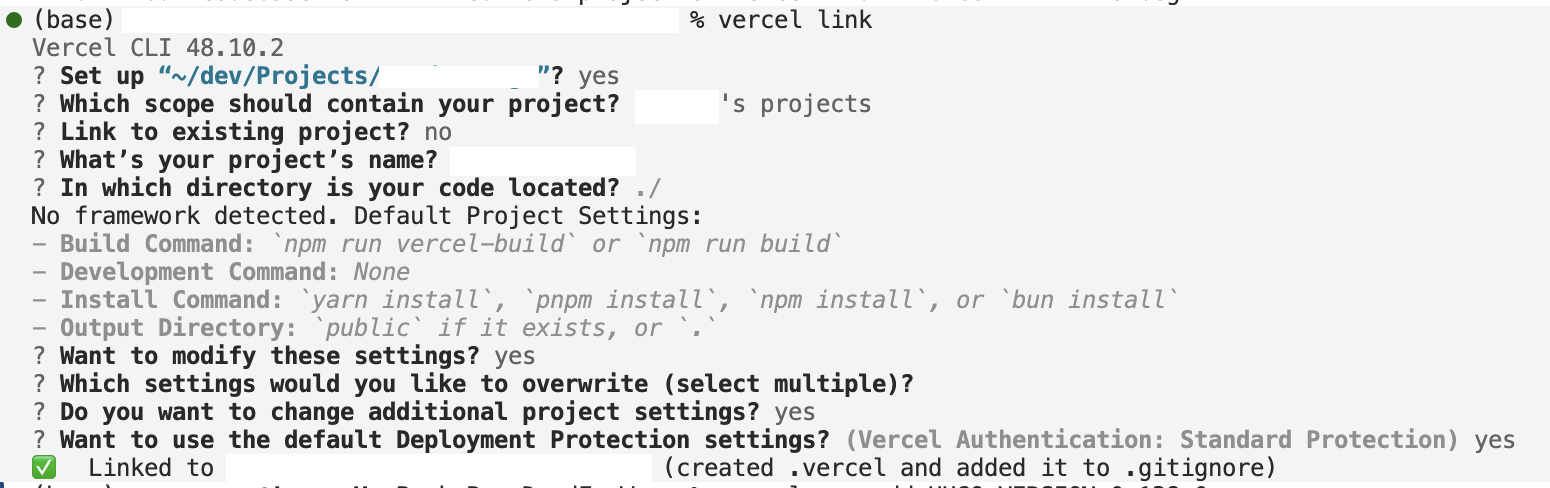
- Set environment variables in vercel:
vercel env add HUGO_VERSION 0.138.0
vercel env add HUGO_ENV production
vercel env add HUGO_EXTENDED true
- Set your build command:
vercel build
- This will locally build your site using the same configuration as Vercel.
Step 9: Preview the Deployment Locally Link to heading
- Use Vercel CLI to run a local server:
vercel dev
- This will allow you to view your site locally just as it would appear on Vercel.
Step 10: Deploy Directly to Vercel Link to heading
- If everything works perfectly, you can deploy directly to Vercel.
- First change the baseurl in
config.tomlto your website url which is given by vercel. - Then run the following command to create production build which will link to actual domain set in baseurl instead of default hugo localhost url i-e
# hugo --gc --minify --buildDrafts --buildExpired --buildFuture
hugo --gc --minify
- Finally deploy this production build on vercel.
vercel --prod
- This will push your current state of your project directly to your Vercel project.